How to Change a Key Fob Battery, Step by Step
Published Oct 23, 2026 · 5 min read · By Hassan, Owner of Roadmate Services
You press unlock. Nothing. You press it again, harder, and still nothing. How do you change a key fob battery? Slide out the hidden metal key, open the case at the seam, note which side of the old coin cell faces up, fit a new one with the same code the same way up, then close it and test it. On most fobs it takes a few minutes.
The battery code, such as CR2032, is printed on the old cell and in your owner’s manual.
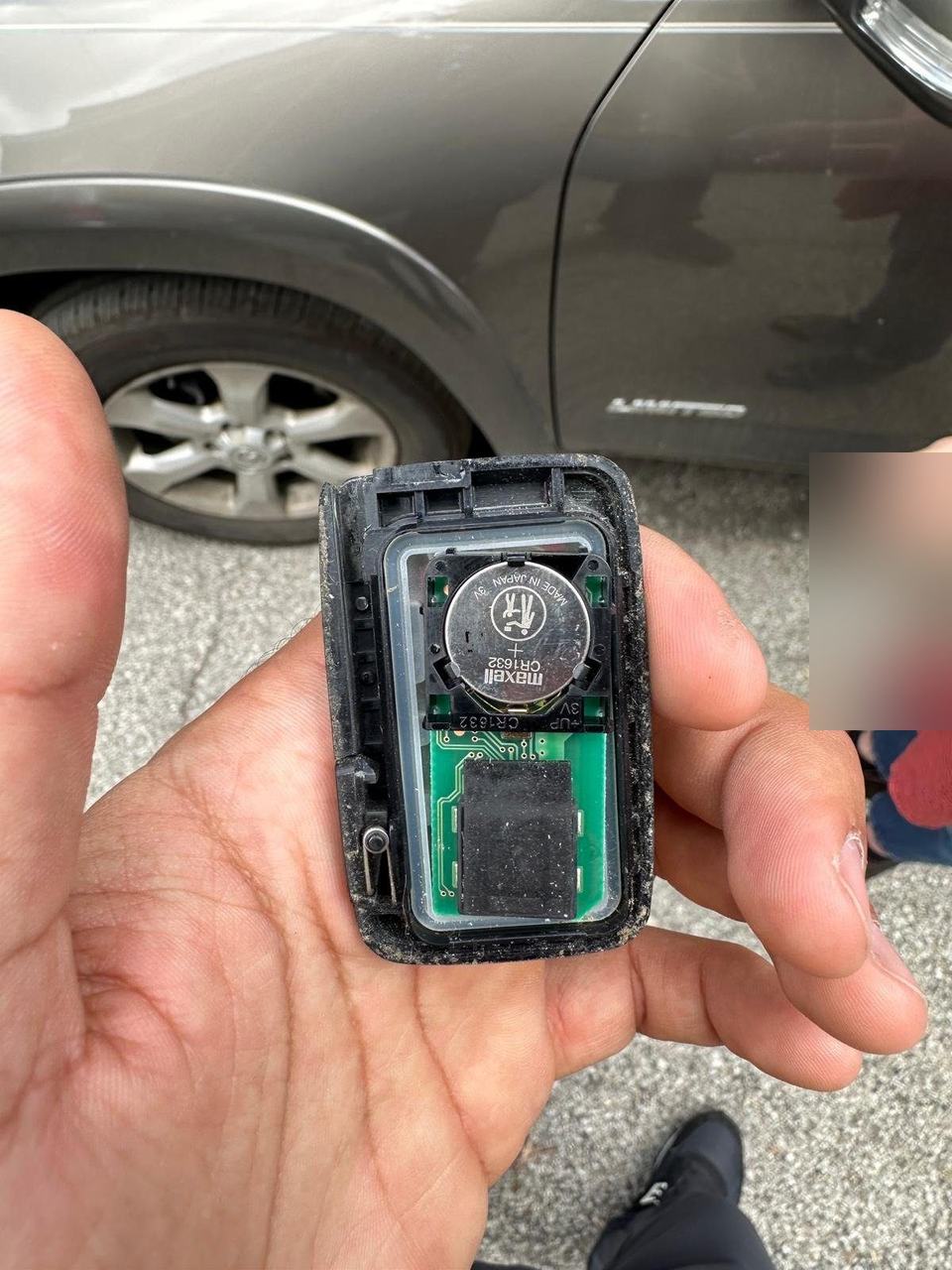
Quick answer: how to change the battery in a key fob
| Step | What to do | What can go wrong |
|---|---|---|
| 1 | Slide out the hidden metal key | Forgetting it exists |
| 2 | Open the case at the seam or key slot | A cracked clip from forcing it |
| 3 | Note which side faces up, remove the old cell | A bent battery contact |
| 4 | Fit a new cell with the same code, same side up | Wrong code, or upside down |
| 5 | Close it, test lock, unlock and start | Fob needs reprogramming (dealer or locksmith) |
| Total | Five steps, usually a few minutes | Read the code on the old cell first |
If your carmaker’s instructions differ, follow them. Ford, for example, has its own key fob battery how-to.
Signs your car key battery is dying
- You have to stand closer before the locks respond.
- You press the button several times before anything happens.
- The dash shows a “key battery low” or “key not detected” message.
Pressing the button harder does not help. We have all tried, and the fob has never once been impressed.
What battery does a car key fob use?
Most fobs take a flat lithium coin cell. The common codes are CR2032, CR2025 and CR2016, according to a fob retailer’s guide, and AutoZone also lists the larger CR2450. These are general market figures, not a list for your car.
Match the code exactly: a CR2025 is thinner than a CR2032 and may fit loosely. It is a little humbling that a battery the size of a shirt button runs the locks on a two-ton car.
How to replace the key fob battery
What you need
- A new coin cell with the same code as the old one.
- A small flat screwdriver, a plastic pry tool or a coin.
- A soft cloth, so small parts do not roll away.
Step 1: Remove the hidden key blade
Most fobs hide a metal key inside. Press the release or slide the latch and pull it out. It is the spare tire of your key ring: easy to forget until the day it opens the driver’s door for you.
Step 2: Open the case at the seam
Find the notch along the seam, often where the key blade sat. Twist your tool gently and work around the edge. If it does not give, try another notch. Plastic clips crack easily.
Step 3: Note which side faces up, then remove the old cell
Check whether the “+” side faces up or down, or take a photo. Ease the old cell out, keeping the tool away from the metal contacts and the circuit board.
Step 4: Fit the new cell without touching the flat faces
Hold the new cell by its edges and press it in with the same side up as the old one. Skin oil on the flat faces can weaken the contact.
Step 5: Close it and test lock, unlock and start
Press the halves together until they click all the way round and put the key blade back. Test every button, then start the car.
Keyless fob battery changed and still not working?
Quick checks below; the full list, including “key not detected”, is in key fob not working.
- Upside down: open it and flip the cell.
- Contacts: a contact bent away from the cell will not touch it. Ease it back gently.
- Wrong or old cell: check the code, and try a cell from a fresh pack.
- Fob needs reprogramming: some fobs lose their pairing. A dealer or locksmith can redo it.
If the car is also slow to wake up, suspect the car battery instead. See signs your car battery is dying.
Can you start the car with a dead fob?
On many push-button cars, yes. The car can still read a fob with a dead battery held against the start button or placed in a marked spot. The spot differs by make, so check the owner’s manual now. Reading the manual before you need it is the most underrated hobby in motoring.
Coin cell safety at home
Coin cells are dangerous if swallowed. The U.S. Consumer Product Safety Commission warns that a swallowed button or coin battery can cause serious internal burns.
- Keep new cells packaged and out of reach of children and pets.
- Tape over the old cell and store it out of reach until you recycle it.
- If you think a child has swallowed a battery, get emergency care right away. Do not wait for symptoms.
Locked out because of a dead fob in Columbus
A dead fob outside the car feels like an emergency. Most of the time it is a few minutes with a coin cell, and the hidden key opens the driver’s door meanwhile. No spare cell on you? Our technician can replace the fob’s coin cell on site.
If the keys are locked inside the car, that is a lockout, and we can open the car. If a child or pet is locked inside, call 911 first.
A car lockout in Columbus is an estimated $75 to $175. After hours, at weekends, or on a smart-key or luxury car it can cost more, quoted by phone or on site. A dispatcher confirms the price before anyone drives to you.
We work 6 AM to 8 PM daily, Eastern Time, and arrive in about 32 minutes on average, depending on traffic, weather and location. As Hassan says, check for the keys before you lock the door; finding them inside afterwards is not a fun moment. For more, read what to do when you are locked out of your car.
Frequently asked questions
Can I change a key fob battery myself?
Yes, on most cars. You need the right coin cell and a small flat tool or a coin. If your owner's manual says the dealer must do it, follow the manual.
How do I open a key fob?
Remove the hidden metal key, then find the small notch at the seam. Twist a flat tool or coin in it gently and the halves separate.
What battery does my key fob take?
Usually a coin cell such as a CR2032, CR2025, CR2016 or CR2450. The code is printed on the old battery and in your owner's manual. Buy the exact same code.
Do I need to reprogram my fob after changing the battery?
Usually not. Most fobs keep their programming. If the buttons still do nothing with a fresh cell fitted the right way up, ask a dealer or locksmith.
How long does a key fob battery last?
A few years, depending on use. Published figures range from 1 to 2 years to 2 to 4 years. A shorter range is the usual early warning.
Battery codes and lifespans are market figures from keylessentryremotefob.com (1 to 2 years) and AutoZone (2 to 4 years). Checked October 2026.
The bottom line
To change a key fob battery, take out the hidden key, open the case, match the coin cell code, fit it the same way up and test every button. If it still does nothing, check the contacts, then ask a dealer or locksmith about reprogramming.
Keys locked in the car in Columbus?
We come to you and open the car. Call (380) 288-2822, 6 AM to 8 PM daily, Eastern Time. If a child or pet is inside, call 911 first.
May your next click be the locks, not the sound of you rummaging for a coin.